






PUT YOUR DOCUMENTS TO WORK

Automate the workflow
behind every document.

Capture the information you need, standardise it, apply business checks and send validated records to your systems.

From receipt to delivery Review exceptions
API
Checks passed
Delivered

Your systems

A human touchOnly where needed
Sample data · checked records delivered.
FROM ARRIVAL TO ACTION

OUR CUSTOMERS

Trusted by teams across industries

  • Welbeck
  • Omnix
  • Arabian Shield
  • Latitude Wines
  • Nintex

THE WORKFLOW, END TO END

One process.
Six connected stages.

From the moment a document arrives to the record reaching your system, every stage keeps the work moving. Explore how the steps connect.

01 / 06

Ingest

Start processing when a document arrives.

Upload PDFs and images, import Outlook messages or attachments, or submit documents through the API.

USE CASES

A workflow library for your team.

Explore 30 document workflows across six business areas in the DocAcquire Workflow Library. Choose a starting point, then configure capture, formatting, checks, review and delivery for your process.

Finance & Accounting

Financial document processing

Move invoice, statement and purchase-order details into a consistent record for your finance process.

EXAMPLE WORKFLOWS
  • Invoice Processing
  • Bank Statement Processing
  • Purchase Order Processing
WORK REMOVED

Less manual entry and reformatting across finance documents.
Investment Management

Settlement instruction processing

Turn cash settlement instructions into structured records for your team and connected systems.

EXAMPLE WORKFLOWS
  • Cash Settlement Instructions Processing
WORK REMOVED

Less manual transcription of settlement details.

Operations & Logistics

Shipment & delivery document processing

Capture shipment references and delivery details for checks and delivery into your operations systems.

EXAMPLE WORKFLOWS
  • Bill of Lading Processing
  • Proof of Delivery Processing
  • Rate Confirmation Processing
WORK REMOVED

Less rekeying of transport and delivery document details.

INSIDE DOCACQUIRE

Build your workflow.

Define the record your system needs. Use sample documents to configure capture, transformations and checks, choose a review policy, then test the workflow before activation.

Explore the platform

See a configured workflow and exception review in your demo.

DOCACQUIRE / FIRST WORKFLOW
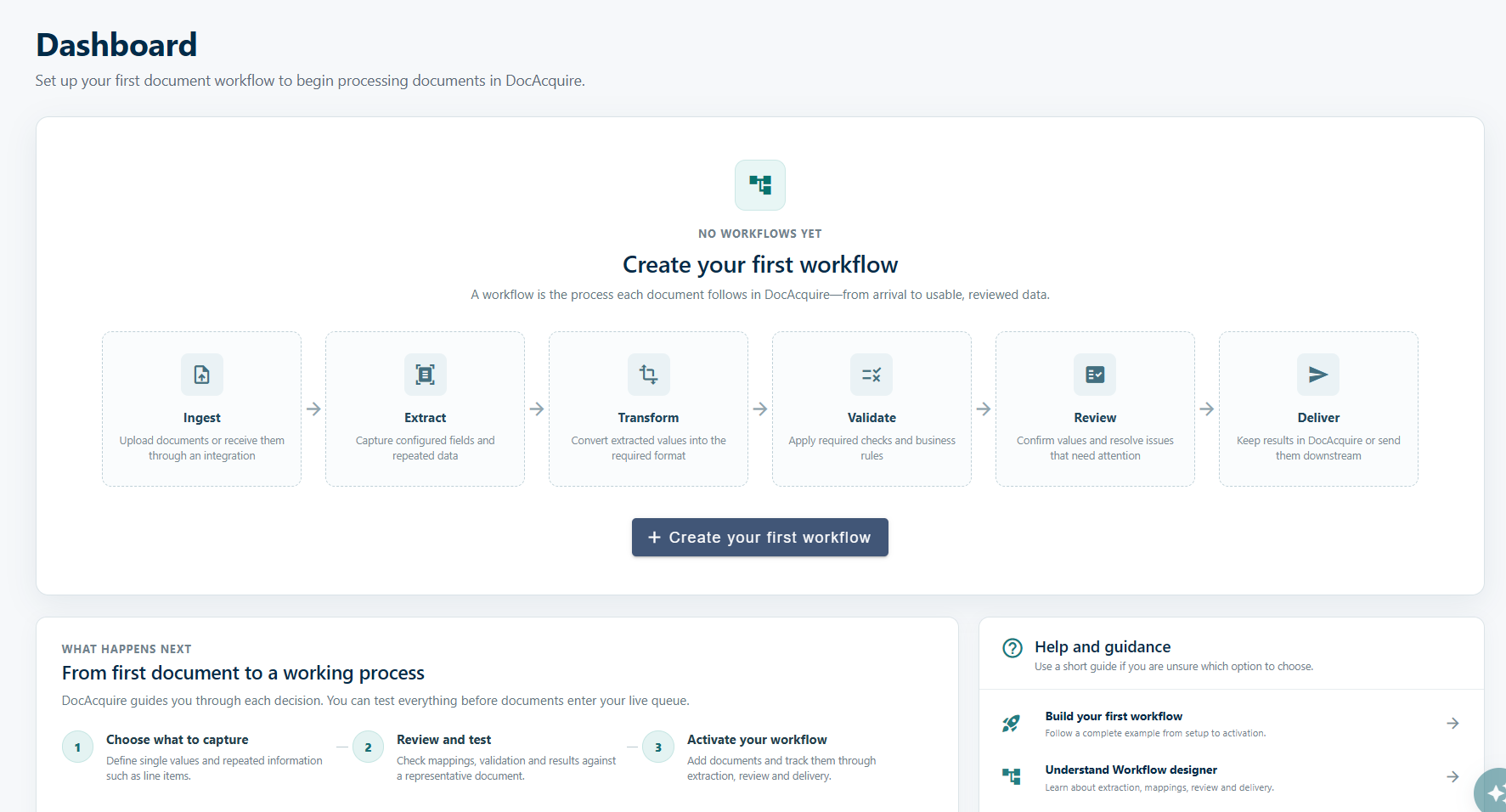
Actual DocAcquire starting dashboard, before a workflow is configured, with Create your first workflow and setup guidance.
The starting dashboard, before your first workflow is configured.

OUR CUSTOMER SUCCESS

In our customers’ words.

Latitude Wines

"The complexity of the documents we process was a challenge for every vendor we assessed, but DocAcquire did the job perfectly."

Philip BurkhartOwner, Latitude Wines USA
Ubiquity

"DocAcquire solution in data capture and ML models allow us to expand our services offer through a strong combination of technology accuracy dealing with complex unstructured data, flexibility and outstanding support."

Denny MoraisHead of Automation & Projects Director Portugal
Jaam Automation

"DocAcquire was super easy to get up and running. Within 15 mins we'd extracted all data, within an hour we'd configured our own document types, within a day we'd it integrated with our end-to-end workflow processes."

Graham PenmanHead of Automation, Jaam Automation UK
Tevince

"DocAcquire is a great solution to capture data from various sources with multiple formats. DocAcquire has helped us to help our customers to deliver a great value and helps in end to end automation using RPA."

Rahul UppalCEO @ Tevince India

A FEW THINGS TO KNOW

Before you
get started.

Have a specific process in mind?
Let’s talk about it

What is a workflow in DocAcquire?

A workflow is the process each document follows in DocAcquire, from receipt through delivery into your next business system. It connects ingestion, extraction, transformation, validation, review and delivery.

What do I set up first?

Start by choosing what to capture, including individual fields and repeated information such as line items. Then check the mappings, validation and results with a representative document before activating the workflow.

How are transformation and validation different?

Transformation converts extracted values into the format you need. Validation applies required checks and business rules to that data. Both happen before the review and delivery stages.

Is data review the same as business approval?

Yes. Choose review for all documents or exceptions, or omit routine review. People can check and correct document values; blocking validation failures still need attention. This is data review. Invoice authorisation, payment approval and other business decisions take place in your downstream process.

Where do the results go?

Deliver eligible records to a configured destination such as Zoho Books, a webhook, SQL Server or cloud storage. Delivery completes the DocAcquire document workflow; the receiving system handles the next business activity.

Can I test before processing live documents?

Yes. Review and test your mappings, validation and results against a representative document before activating your workflow.

LET’S CONNECT THE STEPS

Move your business
processes forward.

Show us where work slows down. We’ll help you automate the document-driven steps and connect them to your wider business process.

Book a demo